Overview
The Congressional Record MCP server gives AI assistants direct access to U.S. Congressional Record data through five read-only tools: dates, the members who spoke, a day's topics, a debate's statements, and keyword or semantic search.
It is built on the official MCP Python SDK and speaks the current MCP
specification (2026-07-28) as well as earlier versions back to
2024-11-05, so both new and older clients can connect.
Authentication
The MCP server signs you in with OAuth through your Second Congress account. Every request needs it, including listing the tools. When you add the server, your client (Claude, ChatGPT, Claude Code, Cursor, VS Code and others) opens a sign-in window; after that it handles the tokens itself. You don't need an API key.
Usage counts against your free account's daily allowance, the same as the website and the API. Semantic searches come out of one daily allowance shared by all three.
Claude Connector Setup
This is the fastest way to use the Congressional Record MCP with Claude. You add a custom connector once, sign in, and then toggle it on in any chat.
Step 1 — Open Connector Settings
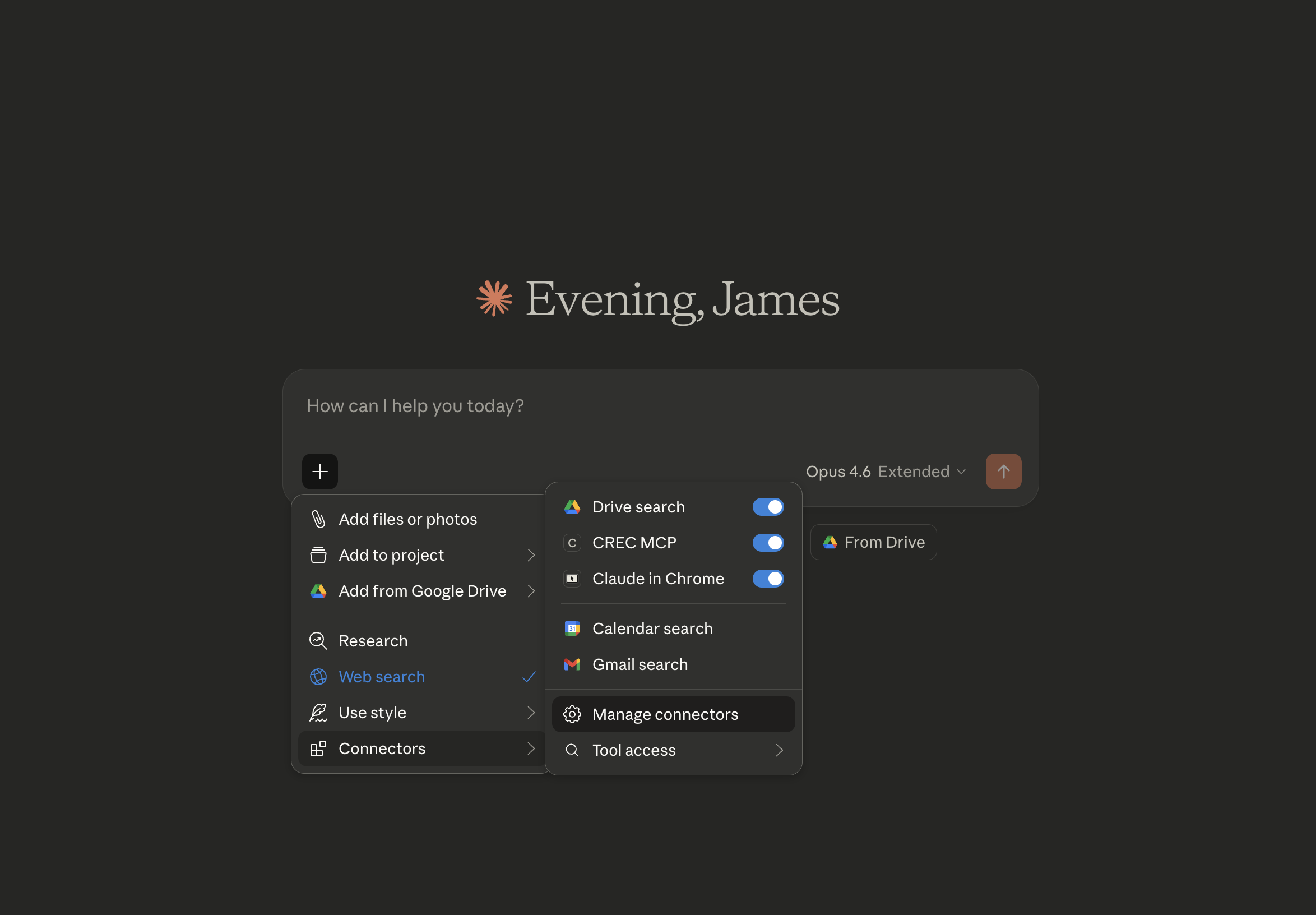
In a new Claude chat, click +, then go to
Connectors → Manage connectors.
Step 2 — Add A Custom Connector
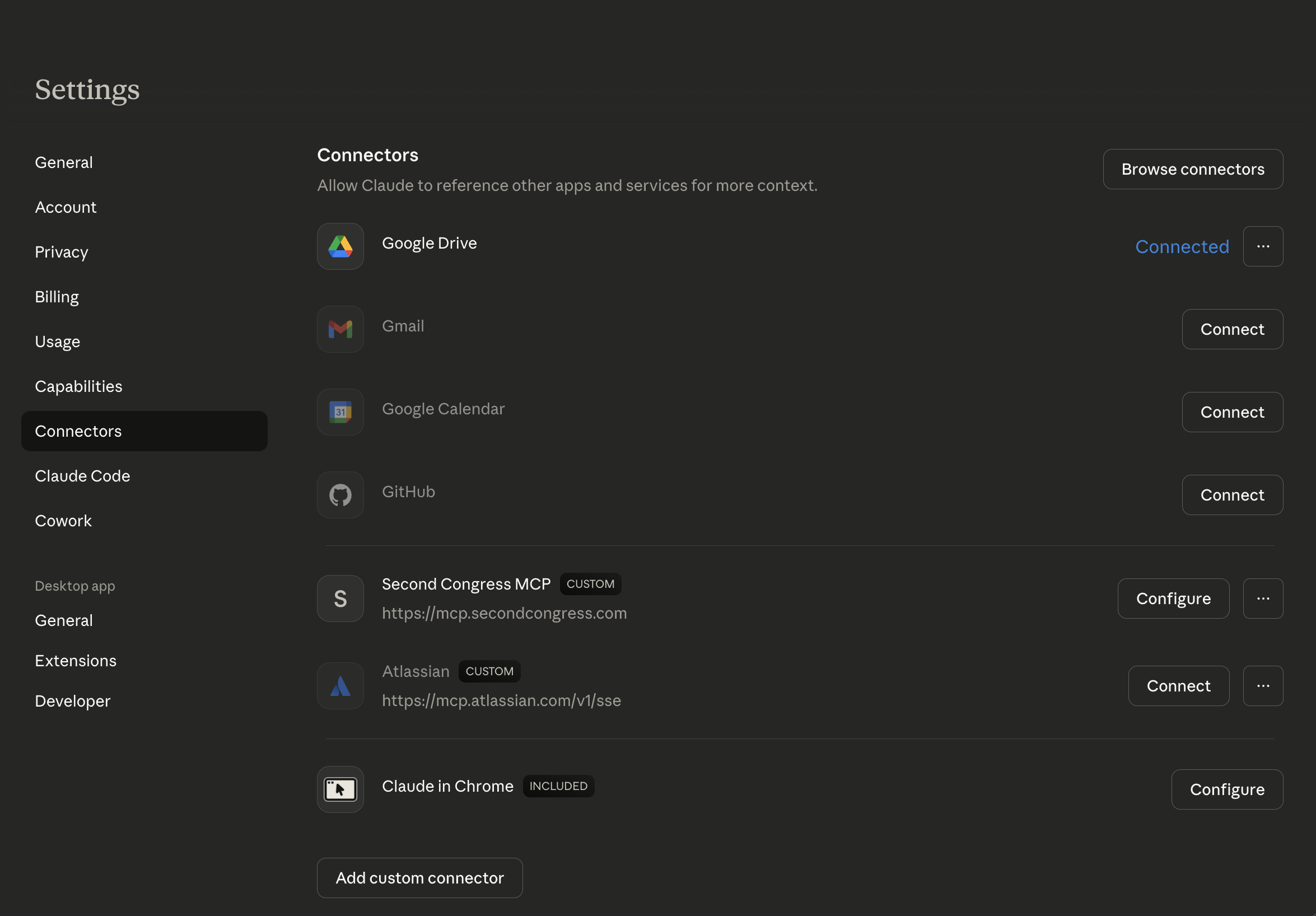
Click Add custom connector at the bottom.
Enter a name (e.g. Second Congress MCP) and set the URL to
https://mcp.secondcongress.com.
You do not need to enter anything in Advanced settings. Click Add.
Step 3 — Confirm It Appears In Your Custom Connectors
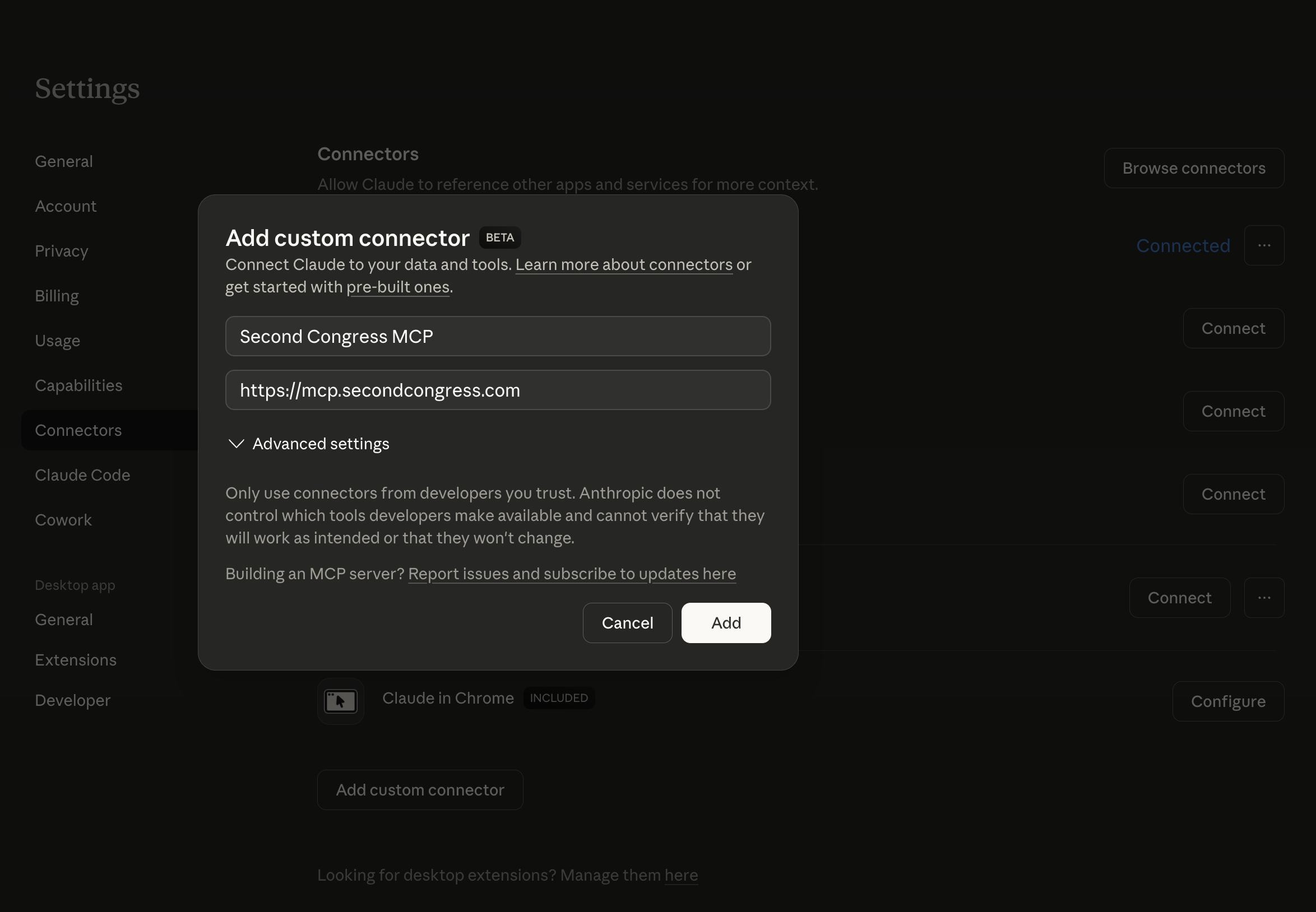
You should now see Second Congress MCP in your list of custom connectors.
Step 4 (Optional) — Configure Tool Permissions
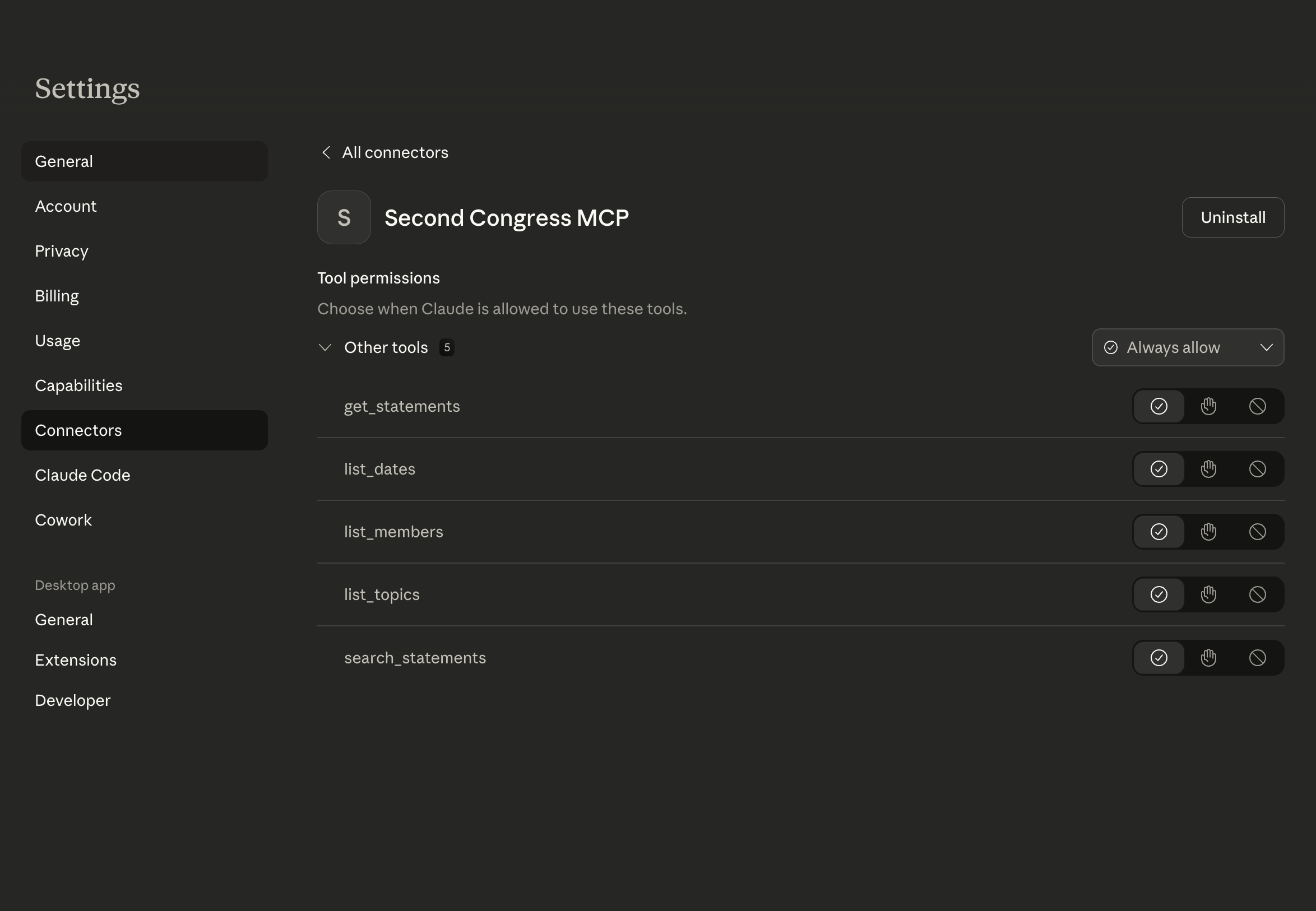
Click Configure next to the connector to adjust tool permissions.
Step 5 — Toggle It On In Chats
In any chat, click + → Connectors, and confirm the connector is toggled on.
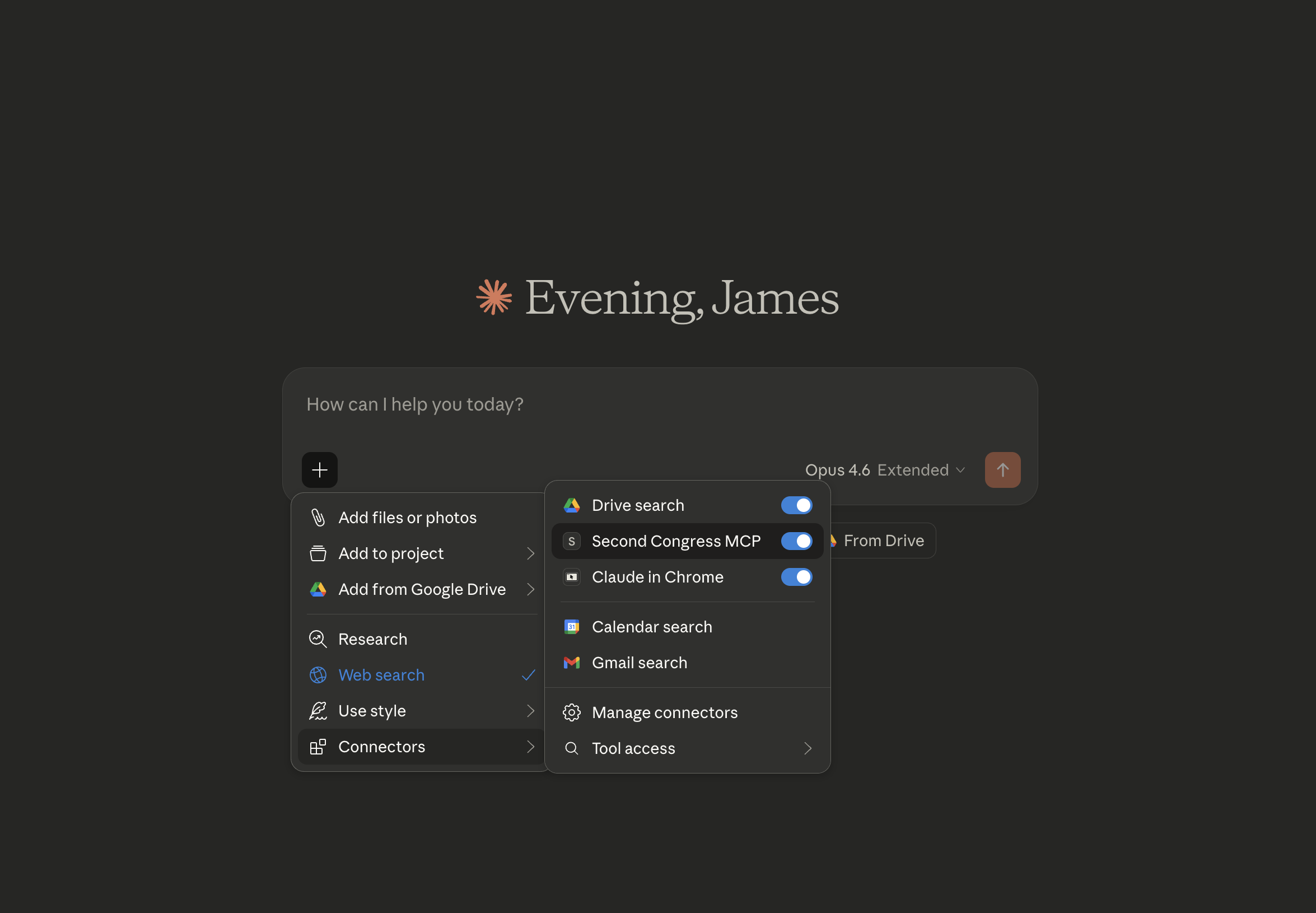
If Claude prompts you to sign in and authorize access, complete the OAuth flow and then return to the chat.
Quickstart
| Step | Action |
|---|---|
| 1 | Create an account if you don't have one. |
| 2 | Add the server to your MCP client at https://mcp.secondcongress.com/mcp. The address without /mcp works too. |
| 3 | Sign in when your client asks. |
| 4 | Ask a question, or call a tool: list_dates, list_members, list_topics, get_statements, search_statements. |
Tools
All five tools only read data; each is marked read-only to your client.
| Tool | What it does | Inputs |
|---|---|---|
list_dates | Dates that have Congressional Record statements | None |
list_members | Members who spoke on a date | date (required), chamber, state, limit |
list_topics | Topics debated on a date, most statements first. Each has a topic_id for get_statements. | date (required), chamber |
get_statements | The statements in one debate | topic_id, or topic_title with date or congress_number; chamber, limit, offset |
search_statements | Search statements by keyword or by meaning | query (required), mode, chamber, state, congress_number, date_from, date_to, search_in, page, page_size |
Parameters
Parameters with the same name mean the same thing in every tool.
| Parameter | Type | Description |
|---|---|---|
date, date_from, date_to | string | A date as YYYY-MM-DD. The range in search_statements includes both ends. |
chamber | string | "House", "Senate", or "Extensions of Remarks" (written statements) |
state | string | Full state name, e.g. "Texas" |
congress_number | integer | Which Congress, e.g. 119 for 2025–2026 |
mode | string | "keyword" (default) matches the words. "semantic" matches the meaning and counts against your daily allowance. |
search_in | string | "title", "statement", or "both" (default). Keyword mode only. |
limit, offset | integer | Paging for list_members and get_statements. limit is 1–1,000. |
page, page_size | integer | Paging for search_statements. page_size is 1–100 (default 50). |
Rules, Errors and Limits
| Tool | Rule |
|---|---|
list_members, list_topics | date is required. |
get_statements | Give a topic_id, or a topic_title together with a date or congress_number. |
search_statements | query is required, up to 300 characters. |
A call that breaks a rule, or that the API refuses, still returns a normal tool
result, marked isError: true, with a message that says why, so your
assistant can read it and adjust:
{
  "isError": true,
  "content": [
    { "type": "text", "text": "Error executing tool search_statements: You've used today's 20 semantic searches. Keyword search is still unlimited. The count resets at midnight UTC." }
  ]
}
Limits
- Your account's daily allowance applies, as on the API: 20 semantic searches a day (shared with the website and API), 100 other calls a day, and 250 results into one search. Paging through one search counts once.
- 120 requests a minute per IP address at the MCP server, plus the API's per-minute limits.
Examples
Each result has structuredContent, the JSON below, and the same JSON as text.
list_dates — Find available dates
{
  "name": "list_dates",
  "arguments": {}
}{
"items": [
{ "date": "2025-03-12" },
{ "date": "2025-03-13" },
{ "date": "2025-03-14" }
],
"total_count": 3
}list_members — Who spoke on a date
{
  "name": "list_members",
  "arguments": { "date": "2025-03-14", "chamber": "Senate", "state": "Texas" }
}{
"items": [
{
"name": "John Cornyn",
"state": "Texas",
"district": null,
"political_party": "Republican",
"picture_url": "https://...",
"website": "https://..."
}
],
"total_count": 1
}list_topics — A day's debates
{
  "name": "list_topics",
  "arguments": { "date": "2025-03-14", "chamber": "Senate" }
}{
"items": [
{
"topic_id": "b2c3d4e5-6789-abcd-ef01-23456789abcd",
"topic_title": "FULL-YEAR CONTINUING APPROPRIATIONS ACT, 2025",
"date": "2025-03-14",
"chamber": "Senate",
"statement_count": 14
}
],
"total_count": 1
}get_statements — Read one debate
{
  "name": "get_statements",
  "arguments": { "topic_id": "b2c3d4e5-6789-abcd-ef01-23456789abcd", "limit": 20 }
}{
"items": [
{
"id": "f1e2d3c4-9876-5432-abcd-fedcba987654",
"name": "Susan Collins",
"chamber": "Senate",
"date": "2025-03-14",
"title": "FULL-YEAR CONTINUING APPROPRIATIONS ACT, 2025",
"topicGroupId": "b2c3d4e5-6789-abcd-ef01-23456789abcd",
"text": "Mr. President, ...",
"wordCount": 412,
...
}
],
"total_count": 14,
"next_offset": null
}Each statement has the same fields as the API's statement schema.
search_statements — Search by meaning
{
  "name": "search_statements",
  "arguments": {
    "query": "concerns about tariffs raising prices for farmers",
    "mode": "semantic",
    "chamber": "House",
    "date_from": "2025-01-01",
    "page_size": 10
  }
}{
"results": [
{
"id": "e5f6a7b8-...",
"name": "...",
"title": "...",
"similarity": 0.81,
"matchedChunk": "...the passage closest to the question...",
...
}
],
"totalCount": 412,
"countCapped": false,
"resultLimit": 250,
"page": 1,
"pageSize": 10,
"totalPages": 25
}The result is the same as the API's search response.